



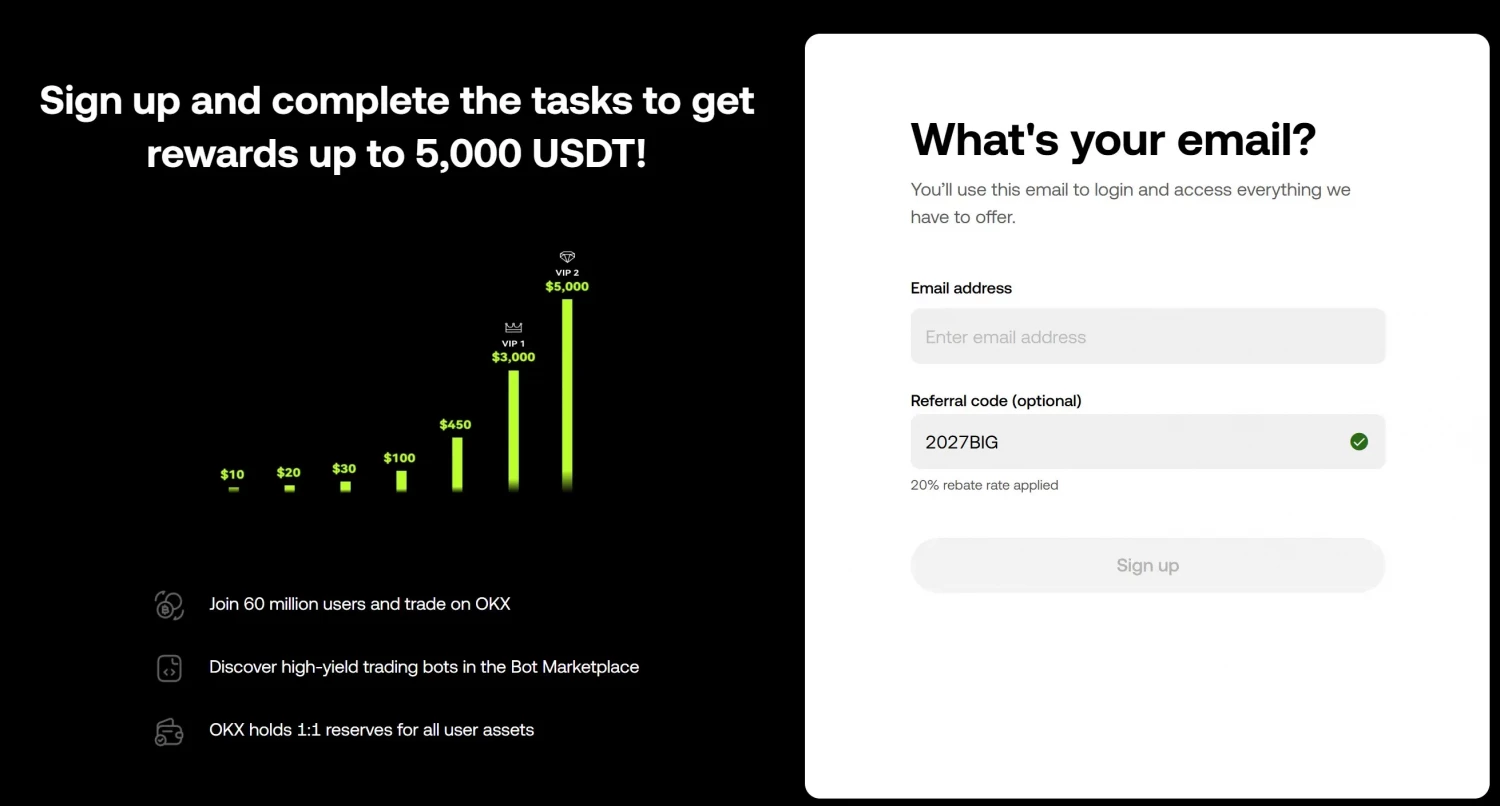
The current OKX referral code is 2027BIG. Enter it during registration to get a 20% trading fee rebate and welcome rewards of up to 5,000 USDT.
You can't add the code after the account is created — not even through customer support.
Where to enter the OKX referral code
- Open the OKX sign-up page.
- Select your country.
- Enter your email.
- Just below, type 2027BIG in the "Referral code (optional)" field. A green checkmark appears with the line "20% rebate rate applied" — the code is accepted and the discount is locked in.
How to use the promo code's rewards
After identity verification (KYC), the following become available:
- 20% rebate on trading fees. Applied automatically after KYC — the sign-up screen confirms the rate the moment the code is accepted. For anyone trading actively over a long horizon this saving outweighs the welcome bonus.
- Trading bonus up to 5,000 USDT. Credited for deposits and for meeting trading-volume conditions. Plenty of sites still quote a 10,000 USDT maximum. The current sign-up offer is 5,000 USDT — that's the number on the campaign screen above. Active tasks live in the "Campaign Center", and you claim the reward in "My Rewards". It can land as a crypto airdrop, a trading bonus, a rebate card voucher, a contract voucher, or an Earn APR boost.
The ladder on the campaign screen, step by step:
| Tier | What it takes | Reward |
| Task chain | deposits and first trades, one step at a time | 10 → 20 → 30 → 100 → 450 USDT |
| VIP 1 | trading volume at the VIP 1 level | 3,000 USDT |
| VIP 2 | trading volume at the VIP 2 level | 5,000 USDT |
The VIP rows are cumulative ceilings, not extra payouts: reaching VIP 2 caps the whole package at 5,000 USDT.

On my own account, "My Rewards" shows 553 USDT accumulated over six years of trading — one active account, not a typical result. I never chased the tasks: registered, passed KYC, traded at my own pace.
Can anyone give you more than 20% off on OKX?
No. 20% is the ceiling OKX allows a partner to give. In the partner dashboard the invitee’s rate is a field capped at 0–20%, and that’s the screen below. Anything advertised as a 30% or 50% OKX referral discount is a number the platform can’t produce.
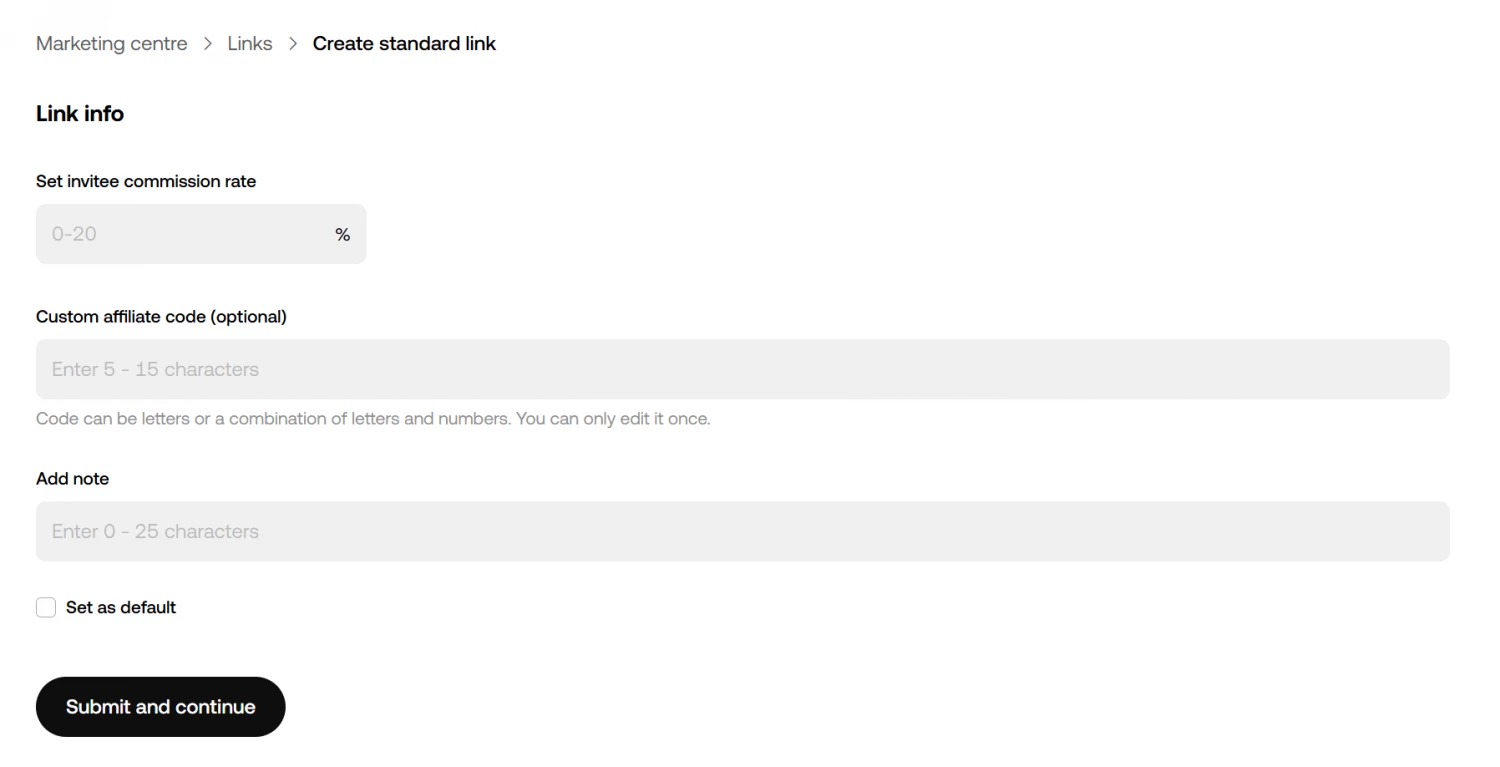
Creating a referral link in the OKX partner dashboard: the invitee's rate can't go above 20%.
OKX rebate calculator: what the code saves you
Enter your daily volume and choose the market and order type to see what the 20% rebate is worth in USDT over a month.
Estimated savings on trading fees only. Funding payments are not included.
At the default 10,000 USDT a day of spot taker volume, the code takes the fee from 0.10% to 0.08% and saves about 60 USDT a month. That’s the 20% ceiling from the dashboard above, in money rather than percent.
How we keep the OKX code current
Every month we run three checks:
- We log into the partner dashboard and confirm that the code is still linked to our account and active.
- We open the OKX site without logging in and walk through the new-user flow up to the code field, and check that "20% rebate rate applied" appears below it.
- We follow campaign announcements through OKX's official channels — new bonus information shows up on Telegram, on the website, and on X.
The date in the card at the top of the page is the last of those checks.
Why the rebate or bonus didn't arrive
| What you see | Why | What to do |
| No green checkmark and no "20% rebate rate applied" line | the code wasn't accepted, usually a typo | retype 2027BIG before you press "Sign up"; after that the field is gone for good |
| The rebate line showed, but "My Rewards" is empty | KYC not passed yet | pass identity verification, the tasks unlock after it |
| The welcome bonus on your screen is smaller than 5,000 USDT | the bonus package differs by market and campaign, the 20% rebate doesn't | check "Welcome Rewards" before you finish registering: what's listed there is what your account gets |
| A task is done, but nothing was credited | rewards aren't automatic | claim it in "My Rewards"; it may land as an airdrop, a voucher or an APR boost, not as cash |