



The best Bitget referral code to use when signing up is 2027PRO. Enter the code during registration to get a 20% discount on spot and futures trading fees and access welcome rewards of up to 6,200 USDT.
One thing to know before you compare offers: in Bitget's referral program the invitee discount caps at 20% — the partner panel has no higher setting, we checked ours, and the screen is further down, in the check block. Anything advertised as 40% or 50% off via a Bitget referral or promo code is a number the program doesn’t produce.
Where to enter the Bitget referral code
Bitget names this field differently depending on where you are: usually "Referral code", sometimes "Invite Code". Same field either way.
- Open the Bitget sign-up page.
- Enter your email or mobile number.
- Expand the "Referral code" block — it's collapsed by default and easy to scroll past. The field is case sensitive, as the placeholder says, so type 2027PRO exactly as written. The "Caps Lock on" warning that appears is a hint, not an error. Bitget shows no confirmation that it registered — no checkmark, no discount line. That's how the form works, not a sign it failed.
- Tick the box accepting the User Agreement — and note that the promotional-emails box below it is pre-checked, so untick it if you don't want them. Then click "Next".
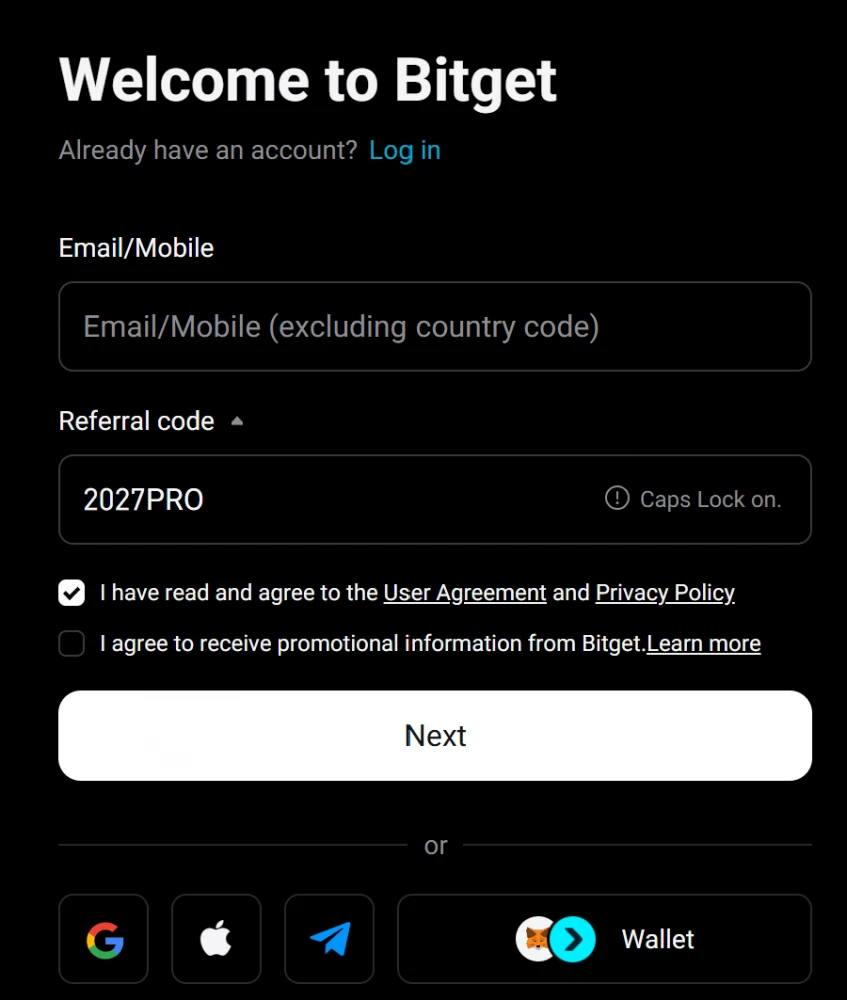
Alternative sign-up methods. You can also register with a Google, Apple, or Telegram account.
What the Bitget new user promo includes
After creating the account, complete identity verification (KYC) to unlock the rewards available to it:
- Bonus. The headline ceiling is 6,200 USDT; what actually lands in a new account is a fraction of that — on ours it started at 50 USDT. It works like this: 200 starting points land in the "Rewards" section alongside a list of temporary and permanent tasks, each with its own deadline, and the points you earn convert into bonuses. The tip under each task's question-mark icon spells out what's credited and why.
- Discount. 20% off trading fees, applied automatically. Over any real timeframe it's worth more than the bonus — 50 USDT once versus a permanent cut on every trade.
- Points. After the window for the main bonus closes, the Rewards Center still has temporary tasks that award points too. For example: a reward for trading at least 200 USDT a day, plus trading-volume and deposit challenges.

What the tasks on that screen are worth, plus two milestones available to you as the invited user:
| Task | What it takes | Reward |
| Daily trading rewards, 7 days | trade at least 200 USDT a day | futures position vouchers from 5 to 150 USDT a day |
| 14-day trading volume challenge | hit the volume targets | tiered incentives, each target on the screen |
| 7-day net deposit challenge | hit the net deposit targets | Spot APR voucher, up to 25% |
| Referral milestone 1 | 500 USDT of your own trading volume | 15 USDT trading bonus in BTC plus a Mystery Box of up to 500 USDT |
| Referral milestone 2 | 50,000 USDT of trading volume | another 15 USDT in BTC plus a Mystery Box of up to 1,000 USDT |
Calculate your savings with the Bitget referral code
Set your daily volume, market and order type to see what the 20% discount takes off your fees over a month.
Estimated savings on trading fees only. Funding payments are not included.
For example, at 10,000 USDT a day of spot taker volume, the code brings the fee from 0.10% down to 0.08% and saves about 60 USDT over a 30-day month. The BGB discount isn’t counted here; it stacks on top, as the next section shows.
How to save more on trading?
On top of the 20% from the code, paying fees in BGB adds its own discount, around 20% at the standard tier. The two apply in sequence, not in sum: a 0.10% base fee goes to 0.08% with the code, then to 0.064% with BGB — about 36% off in total. Check your current BGB rate in the account, it moves with your tier.
That said, the usual token-price risk applies: if BGB drops, the savings on fees may not cover the loss on the token itself. Buying it specifically for the discount makes sense only if you were already planning to hold BGB for other reasons anyway — for instance, to take part in the exchange's promotional events, which often require holding the token.
How it compares
Bitget’s welcome bonus is standard for this group, and the code adds a 20% discount on spot and futures fees on top of it. The practical difference is the form: Bitget’s stays silent when you enter the code, so there’s no second chance to catch a typo.
| Condition / Exchange | Bitget | MEXC | KuCoin | Bybit |
| Welcome rewards | up to 6,200 USDT | up to 10,000 USDT | up to 11,000 USDT | up to 5,140 USDT |
| Referral discount | 20% | 20% | 20% | none |
| Confirmation on the form | none | fee-sharing line under the field | green line in the app, none on the web | green checkmark |
How we check the code
Every month we run three checks:
- We open the Bitget partner dashboard and confirm that the code is still linked to our account and active.
- We go to Bitget in incognito mode and walk through the new-user flow up to the code field. If the code is accepted and registration proceeds — status "working".
- We watch Bitget's official announcements and campaign pages for changes to the bonus terms, and the Telegram channel for anything that lands there first.
The first of those checks looks like this: in the panel, spot, futures, on-chain and CFD all sit at a fixed 20%, and there is nothing to raise.
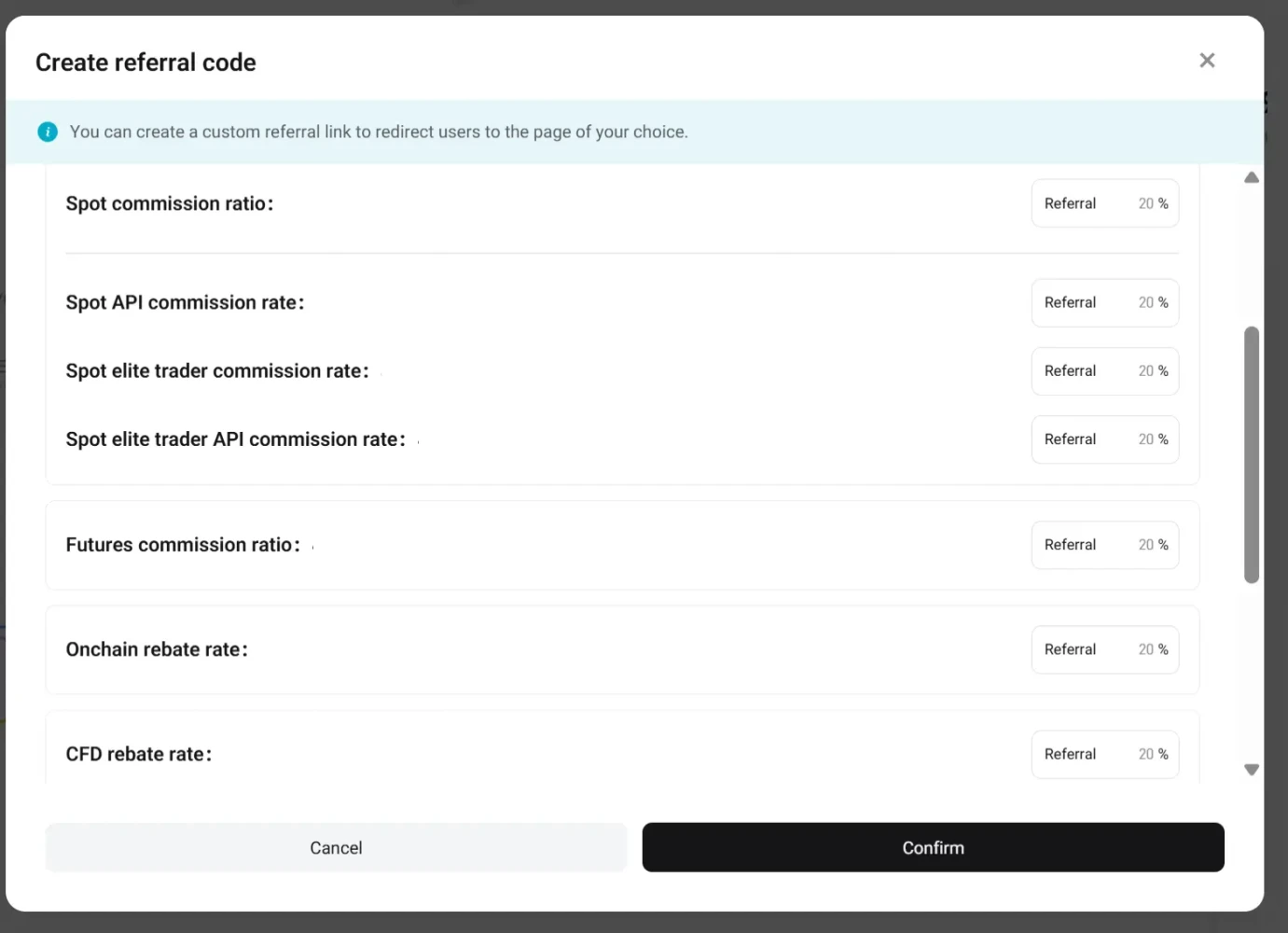
Bitget partner panel, creating a referral code: every product line is locked at 20%
Bitget's form doesn't confirm the code, so the second check is the one we never skip.
Nothing showed up after sign-up? Check in this order
Bitget doesn't confirm the code on the form, so the checks happen after the account exists.
- The form blocks you at the country step. You're registering from the EEA, where Bitget isn't onboarding new users while its MiCA application is pending.
- Look at your fee rate first. With the code attached, the spot rate reads 0.08% instead of the base 0.10%. That's the only confirmation Bitget gives, and it's enough.
- Rewards section empty? Pass KYC. The starting points and the task list unlock after verification, not after sign-up.
- Bonus shows as points, not USDT. That's how it works: points land first and convert into vouchers as tasks complete. The question-mark tip under each task says what's credited and why.
- Expected 6,200 USDT, got 50. So did we. The ceiling is the sum of every challenge; the daily vouchers and the first referral milestone are what a normal account collects.
- Code typed in the wrong case. The field is case sensitive and there's no post-registration fix, so this is the one mistake to avoid before pressing "Next", not after.